Selecting the foundational infrastructure for a website determines more than just your monthly operating expenses. The underlying server environment directly dictates your page rendering speeds, database processing limits, and overall resilience during sudden traffic surges. As search engines place greater algorithmic weight on real-world user experience signals, your hosting environment acts as a silent pillar of your organic visibility strategy.
Many digital publishers treat web servers as an afterthought, prioritizing front-end design over backend processing capabilities. However, a misaligned server choice introduces structural performance bottlenecks that no amount of code optimization can fix. Evaluating how modern shared and cloud setups handle data distribution allows you to choose an architecture that sustains long-term site growth.
The Operational Mechanics of Shared Server Environments
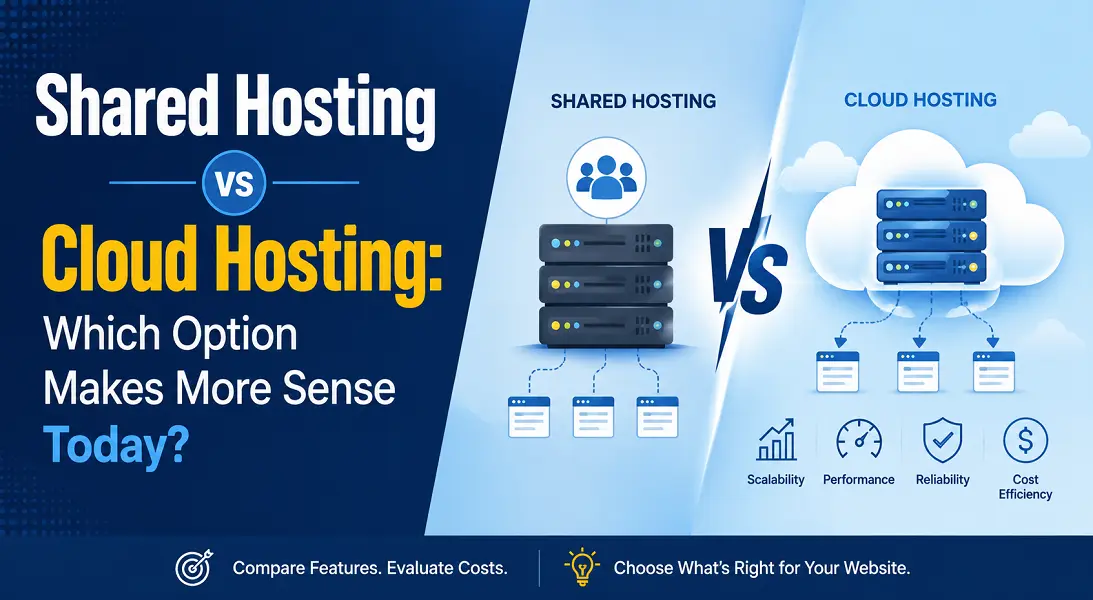
Shared hosting operates as a single, physical server unit partitioned to house hundreds of individual web properties simultaneously. This communal allocation model creates specific behavioral boundaries that every website owner must navigate.
-
Communal Resource Pooling: Your site draws from an identical pool of Central Processing Unit (CPU) cores, Random Access Memory (RAM), and network bandwidth allocations as every neighboring domain on that specific hardware node.
-
The Bad Neighbor Vulnerability: If a completely unrelated website on your shared server experiences a massive traffic spike or runs a poorly optimized database query, your site may experience immediate latency or temporary downtime.
-
Static Performance Thresholds: Resource expansion is locked behind hard operational ceilings, meaning you cannot dynamically allocate extra processing power to handle seasonal promotional events.
-
Pre-Configured Server Governance: System settings, security protocols, and server-side caching software modules are universally locked by the provider, removing your ability to customize the architecture for specialized application scripts.
The Structural Architecture of Cloud Infrastructure
Cloud hosting abandons the constraints of a single physical machine, deploying your digital files across a vast, decentralized network of interconnected virtual servers. This distributed environment redefines operational uptime and computing security.
-
Isolated Virtual Ecosystems: Every domain runs within an entirely segregated hypervisor layer, ensuring that neighboring traffic fluctuations have zero impact on your processing performance.
-
Instantaneous Resource Scalability: Web administrators can dial up CPU cores and memory limits instantly via a single dashboard command to accommodate viral media exposure without rebooting systems.
-
Redundant Data Mirroring: Your web files are systematically replicated across multiple geographical storage nodes, allowing a secondary virtual machine to instantly pick up the load if a hardware failure occurs.
-
Utility-Based Consumption Models: Financial billing structures scale dynamically with your actual bandwidth consumption, ensuring you only pay for the exact computing metrics your audience triggers.
Aligning Server Performance with Core Web Vitals and SEO
The physical speed at which a server processes incoming browser requests heavily shapes your site’s search engine performance. Modern retrieval algorithms monitor specific latency markers, such as Time to First Byte (TTFB), which measures the exact millisecond delay before a server begins delivering text assets.
Shared environments routinely introduce high TTFB spikes due to localized resource congestion. When multiple browsers request data from a shared node simultaneously, queue delays slow down the Largest Contentful Paint (LCP) phase of page rendering. Cloud networks eliminate this operational lag by routing requests to isolated nodes that process database requests instantly. By securing a consistently low TTFB through cloud delivery, you fulfill an essential technical prerequisite for premium organic search placements.
Conclusion
Shared hosting remains a viable, cost-effective launchpad for low-traffic informational properties and portfolio concepts that do not run heavy database scripts. However, for expanding corporate brands, e-commerce applications, and high-volume media properties, cloud hosting is the only architecture that provides the speed, stability, and scaling flexibility required to protect your digital real estate.
Frequently Asked Questions
Is cloud hosting vastly more expensive than a shared account?
While the entry-level baseline price of cloud infrastructure sits slightly higher, its dynamic utility billing ensures you avoid paying for idle server capacity, making it highly cost-efficient as traffic scales.
Can I migrate from a shared platform to the cloud without losing my current SEO rankings?
Yes. Migrating your files preserves your organic visibility completely, provided you maintain identical URL structures, preserve your internal link network, and coordinate DNS records to avoid site downtime.
Do I need advanced system administration skills to manage a cloud server?
Not necessarily. Most modern providers offer managed cloud interfaces that wrap complex command-line server deployment into intuitive, point-and-click control panels.
How does hosting infrastructure impact website security?
Shared networks carry higher cross-site contamination risks; if a hacker compromises a neighbor’s weak script, they can sometimes access the shared root. Cloud servers isolate your environment behind dedicated virtual firewalls.
Which option handles complex WordPress plugins more efficiently?
Cloud environments process database-heavy installations vastly better because they provide dedicated RAM allocations, preventing the script timeout errors that commonly plague heavily customized shared hosting sites.